
- Home
-
Categories
- Phần mềm quản lý sản xuất - Industry Software
- Thiết bị an toàn và phòng cháy chữa cháy
- Nhiệt kế hồng ngoại & thiết bị phát hiện khí
- Đo lực và Mô-men xoắn
-
Thiết bị kiểm tra chất lượng chai thủy tinh
- Kiểm tra thân chai thủy tinh
- Kiểm tra vai chai thủy tinh
- Kiểm tra bên trong chai thủy tinh
- Kiểm tra màu sắc chai thủy tinh
- Kiểm tra cổ chai thủy tinh
- Kiểm tra miệng chai thủy tinh
- Hệ thống lựa chọn chai thủy tinh tự động
- Hệ thống kiểm tra mẫu chai thủy tinh
- Đếm và kiểm tra chai thủy tinh nóng bị tắc
- Kiểm tra mức chất lỏng và vị trí nắp chai
- Kiểm tra chất lượng và nguồn gốc mã sản phẩm
- Hệ thống kiểm tra đáy chai thủy tinh
-
Hệ thống kiểm tra thép trong quá trình cán nóng
- Cảm biến kiểm tra thép
- Thiết bị chụp ảnh quá trình cán nóng thép
- Thiết bị kiểm soát chất lượng và quy trình trong nhà máy thép
- Hệ thống đếm sản phẩm trên dây chuyền cán thép
- Đo độ dài thép
- Hệ thống nhận diện đầu cuộn thép
- Đo kích thước thép nóng chạy liên tục
- Hệ thống kiểm tra bề mặt thép đã gia công
- Máy đo chiều dài thép tấm
- Thiết bị kiểm tra chất lượng mối hàn
- Thiết bị nguồn điện
- Đèn còi chống cháy nổ
- Thiết bị đo độ ẩm nhiệt độ
- Thiết bị xả tĩnh điện
- Mô-đun kỹ thuật số ASi
- Phần mềm quản lý hệ thống
- Phụ kiện
- Nguồn điện công nghiệp
- Thiết bị dò khí
-
Communication equipment
- Wireless broadcast receiver
- Industrial Switch
- Protocol Gateway
- Thiết bị giám sát cảm biến từ xa
- Bộ chuyển đổi giao thức
- Card mở rộng tín hiệu
- Thiết bị mở rộng IO
- VPN Router Công nghiệp - Thiết bị kết nối từ xa
- Thiết bị giao tiếp máy tính - I/O
- Bộ định tuyến - Router
- Bộ chuyển mạch - Switch
- Serial (RS232/485) Converter
- Serial to fiber
- Media Converter
- Remote I/O
- PCI Card
- USB-Serial Converter
- INTERCOM SYSTEM
- Industrial electrical equipment/Explosion Proof
- Industrial computers
- Compression and tension measuring device
- Industrial Inverter
- Humidity-Temperature-Dewpoint measuring device
- Flow / Air Velocity- Volume/ Pressure Equipment
- Cable Industry
- Measurement Industry
- PLC + HMI
- IP Camera - Video Server
- Products
- Partners
- Solutions
- Contact
- Blogs
Details
PIR550 Operating Instructions
The thermometer is a non-contact infrared thermometer. There are many mathematical modes for the Infrared function. Please remember to keep away from children and don’t use it for safety related applications
.png)
Simply aim the thermometer at the measure target with Lens (9) and press Meas. Key (7) to display the surface temperature. The Distance:Spot is 12:1. Please make sure the target area is within the field of view.
Function
Press Mode key (2) for scrolling more display function as follows.
.jpg) 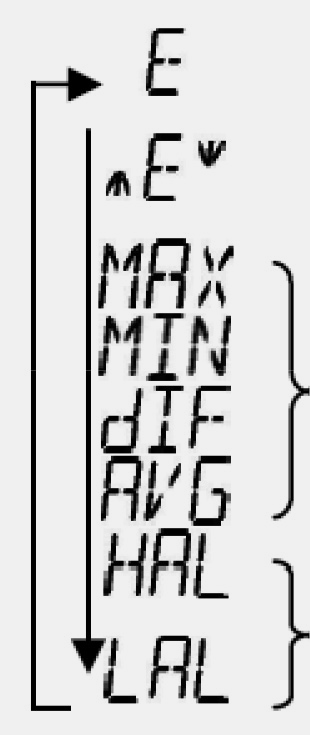 |
Here will show the emissivity data. (The default emissivity is 0.95) |
|---|---|
| Press Mode key (2), then press Lock key (4) or ℃/ ºF key (3) to set the emissivity, then press Mode key (2) to confirm it. The emissivity can be changed from 0.10 (10E) to 1 (100E). | |
| Press Mode key (2) for the Maximum (MAX), Minimum (MIN), Different between MAX and MIN (DIF) and Average (AVG) modes. During the measurement, the special modes reading will be displayed beside the mode icon. | |
| Press Lock key (4)or ℃/ ºF key (3) to change the High Alarm (HAL) or Low Alarm (LAL), then press Meas. key (7) to confirm it. When the reading is outside the High Alarm (HAL) or Low Alarm (LAL) limit. The High or Low icon will flash and you will hear a beep sound. |
ADD VALUE
| In E, MAX, MIN, DIF, AVG mode: | Press Lock key (4) for LOCK mode ON/OFF. The lock mode is particularly useful for continuous monitoring of temperatures for up to 60 minutes. Press ℃/ ºF key (3) for ℃ or ºF transferred. |
|---|---|
| In all modes: First hold on the Meas. key (7) | and press Lock key (4) for backlight function ON/OFF  |
and press ℃/ ºF key (3) for laser function ON/OFF.  |
|
| Memory | Memory Recall the last reading memory by pressing Mode key (2) while power off. |
CAUTION
1. WHEN DEVICE IS IN USE, DO NOT LOOK DIRECTLY INTO THE LASER BEAM–PERMANENT EYE DAMAGE MAY RESULT.
2. USE EXTREME CAUTION WHEN OPERATING THE LASER.
3. NEVER POINT THE DEVICE TOWARDS ANYONE’S EYES.
4. KEEP OUT OF REACH OF ALL CHILDREN
STORAGE & CLEANING
It should be stored at room temperature. The sensor lens is the most delicate part of the thermometer. The lens should be kept clean at all times, care should be taken when cleaning the lens using only a soft cloth or cotton swab with water or medical alcohol, allowing the lens to fully dry before using the thermometer. Do not submerge any part of the thermometer.
BATTERY REPLACEMENT
1. Pull out the rubber gasket. (10)
2. Loosen the screw and pull out the battery cover.
3. Replace and reinstall with new batteries.
4. Place the battery cover back and fasten the screw.
5. Plug the rubber gasket (10) to avoid failure of water proof.
When the ‘Low Battery’ icon indicates the battery is low, the battery should be replaced immediately with AAA, 1.5V batteries. Please note: It is important to turn the instrument off before replacing the battery otherwise the thermometer may malfunction.
Dispose of used battery promptly and keep away from children.
Details
| Measurement Range | -60 ~ 550℃ |
|---|---|
| Operating Range | 0 ~ 50℃ |
| Accuracy | Measured value ±2% or ±2℃ |
| Emissivity | 0.1 ~ 1.0 (default value: 0.95) |
| Response Time | 1 sec |
| D:S (Distance:Spot) | 12:1 |
| Battery Life | min 14 hours continuous use |
| Dimensions | 143.9 x 116.73 x 42.78mm |
| Weight | 180 grams(6.35 oz) including batteries (AAA*2pcs) |
FREE
SHIPPING
100% MONEY
BACK GUARANTEE
ONLINE
SUPPORT 24/7

Featured
Check items to add to cart or select all
Portable Grounding Kit - Bộ phụ kiện nối đất - Newson Gale Việt Nam
Liên Hệ: 0918 364 352
IP Intercom TCIS- 1 - Turbine Compact IP Model: 1008111020 ZENITEL
Liên Hệ: 0918 364 352
IGP-72404XM Eten Việt Nam Eten VietNam
Liên Hệ: 0918 364 352
Related Products

PIR-1500 - Portable IR Thermometer - Gasdna Việt Nam
Regular Price:
Special Price Liên Hệ: 0918 364 352

Contact
Address
No. 66, 36 Street, Van Phuc Residential Area, Ward Hiep Binh Phuoc, Thu Duc City, HCMC, Vietnam.Phone
0918 364 352
Main Features
DienCN247 © 2019. All Rights Reserved
Working Days/Hours
Mon - Sat / 9:00AM - 17:00PM
Mon - Sat / 9:00AM - 17:00PM
